Unbound Bookmaker
  • Home
  • UB Samples
    • UB Editors
  • The Unbound Bookmaker Project
  • UBP Stories
  • UB Blog

Tutorial Tuesday: Gold and Silver Lettering

3/9/2011

 
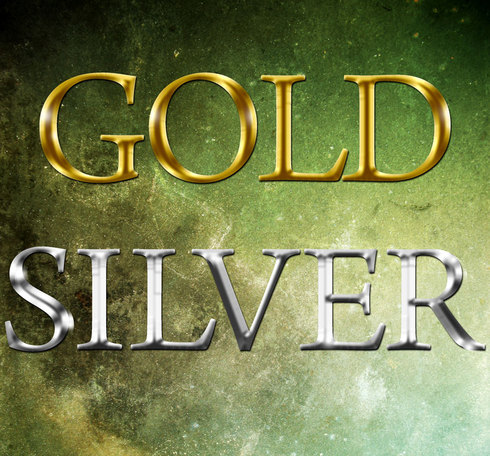
I know I said that I would give you an eBook, but I need some more time than I currently have to produce something worth blogging about. So instead, I watched a tutorial on Lynda.com called Deke's Techniques to set up layer styles that mimic gold and silver. The text is still editable, which is really nice, although I have to readjust some of the sparkles if I move the text. I think it will be very useful for projects in the future. Deke only showed how to do the gold lettering; I then monkeyed with the style to get the silver coloring (not too hard). Stay tuned for eBooks hopefully next week.
Picture

Tutorial Tuesday: Creating an eBook with InDesign Part II

3/1/2011

 
Here once again are my somewhat incomprehensible notes. If you watch the videos on creating eBooks with InDesign on Adobe TV (just search for it), you'll probably have a better grasp of what these digital chicken scratches mean. Next week I'll have the final round of eBook making and include an ePUB file as a practice round that you can open up and see.

To Make an eBook (Part II):
Must have separate InDesign files for each part of the book: cover, front matter, each chapter, back matter, etc. Open all these in an InDesign Book file.

Read More

Tutorial Tuesday: Creating an eBook with InDesign Part I

2/15/2011

 
AdobeTV is most excellent. I watched parts I of II on creating an ePUB file, which causes the content to adapt to different sizes and different eReaders. The following are my slightly incomprehensible notes on the video. I'll do a more thorough job next week of describing what I learned.

Adobe Digital Editions: free eReader

Read More

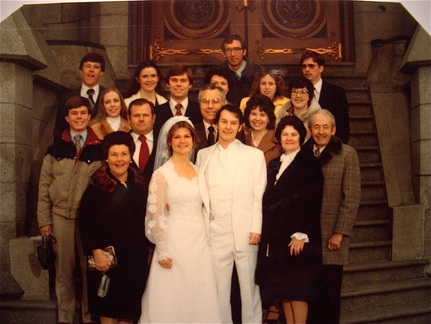
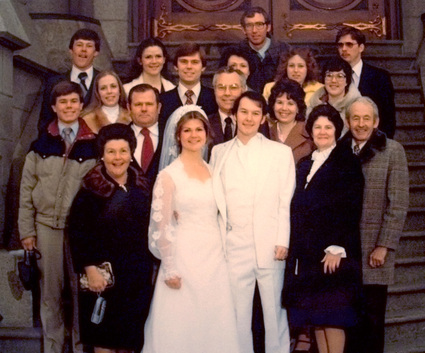
Tuesday Tutorial (A Little Early This Week): Parents' Wedding

2/7/2011

 
Fixed an old photo in Photoshop. Used Color Balance, Levels, Vibrance, Reduce Noise, Despeckle, and fixed my uncle's eye and the scratches above my aunt's head.

Before

Picture

After

Picture

Tutorial Tuesday: Import an Excel Table into InDesign

1/25/2011

 
Very useful tutorial. I imported our bid list and set it up nicely in preparation for Flag Day. Of course, I can't post it on the internet, so you'll just have to go here to check out the tutorial. InDesign CS5 has some great features that will make any future layout project involving tables much less time consuming. I wish I had known this when I typeset my thesis.

Tutorial Tuesday: Review of Photoshop Shortcuts

1/18/2011

 
Tweet
Here is a run-through of all the new Photoshop shortcuts I learned from this site. It will help me memorize them if I can repeat them here (and hopefully be of benefit to you if you ever need to remember them). The majority of these are just for CS5.
  • Command + Space + Click and Drag Left or Right = Zoom in or out.
  • Control + Option + Command+Click = Pick a color.
  • Hold down H + Click = Zoom out to see the bigger picture, and when you let go it zooms in on the area over which you released the mouse.

Read More

Bring a Story to Life Tutorial

1/13/2011

 
Tweet
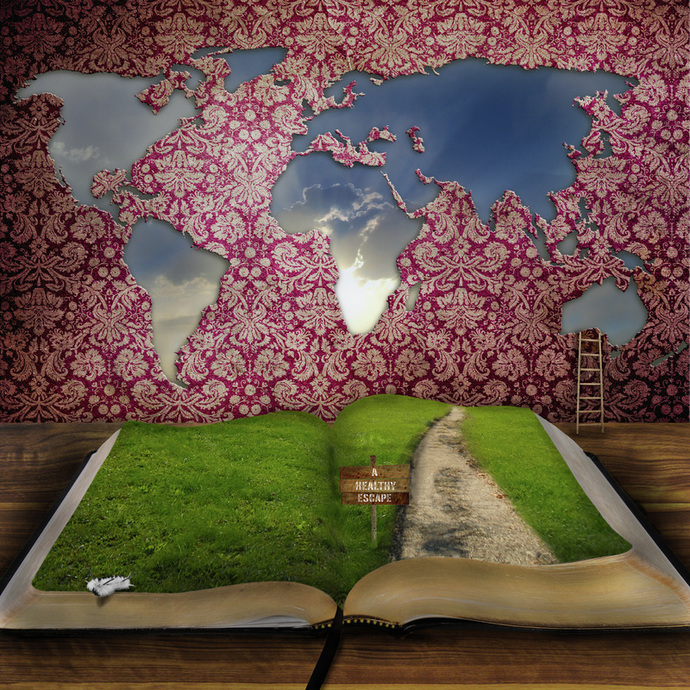
All right, I know it's Thursday night, but I had a lot of fun tweaking this tutorial. The grass, the caterpillar, and part of the sky are from my in-law's place (which is very beautiful), the road is from a trail my husband and I like to visit in Virginia, and the other part of the sky (the sunset part) is from Cinque Terre, Italy. The rest are images I found online. The original tutorial can be found here. People have done some other clever things with this concept. I think I am a surrealist at heart.
Picture

CS5 Rocks

1/7/2011

 
Tweet
My goal is to do a tutorial a week. This is hard for me because I can spend hours and hours on just one project trying to make it better. So these shorter tutorials and not-perfect tutorials will be better for me. This is how to do a content-aware fill in CS5. It can save me tons of time.
Picture
Picture
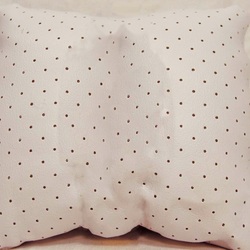
It's just a few clicks to do this: Use the magnetic lasso tool, Edit-->Fill, then clean up with the spot healing brush (J) and the clone tool (which is a million times better in CS5 than in CS3). It's not perfect (I'd fix the bottom of the pillow more), but I learned how to use it and I have a pillow ready for the next display. Pretty neat. I wonder what the algorithm in the programming is for this.

Favicon Added

12/2/2010

 
It's so tempting to go into web design, but expanding UB too broadly will, I think, be more of a detriment than a help. For those of you who don't have a favicon for your website, it's not that hard.

I made the favicon in Illustrator and learned how to do an .ico. A good day.
Picture

Echoes of Eden: Published

10/19/2010

 
The typesetting process for this book was very enjoyable. Call me crazy, but I enjoy fixing word stacks, orphans, and widows. It was very interesting to read and gave me good answers to questions I had earlier this summer. 
Picture

Read More
<<Previous
Forward>>

    Get Updates

    Follow jamiezvirzdin on Twitter

    RSS Feed


    Jamie Zvirzdin

    Andrew and Jamie Zvirzdin
    While I still edit science books and help kids create stories, I've moved my focus to writing science-based fiction and non-fiction stories. See more at www.jamiezvirzdin.com.

    Categories

    All
    Ebooks
    Finished Projects
    Indesign Tutorials
    Keyboard Shortcuts
    Photoshop Tutorials
    UB Project
    Website Tutorials


    Archives

    April 2016
    May 2014
    March 2014
    January 2014
    September 2013
    May 2013
    February 2013
    December 2012
    November 2012
    October 2012
    August 2012
    July 2012
    June 2012
    February 2012
    June 2011
    May 2011
    April 2011
    March 2011
    February 2011
    January 2011
    December 2010
    October 2010
    April 2010


    Links for Self-Publishing Authors
    How to Self-Publish a Book on Amazon
    25 Things You Should Know about Self-Publishing
    How to Publish an eBook
    Lulu vs. CreateSpace

    Excellent Links for Learning
    Learn Photoshop
    Learn Illustrator
    Learn Web Design
    Learn HTML
    Business Card Ideas

    Resources

    Free Fonts
    Identifont
    Ilovetypography
    Typographica
    Typophile
    COLOURlovers
    Clker.com
    Photoshop Textures
    We Love Brushes
    L&T Textures

    Tutorials
    Photoshop Actions

    Publishing Help
    Poets & Writers

    Printers
    Lulu
    CreateSpace

    eBook Conversions
    eBook Architects
    Smashwords
    eBook Conversions Directory
    Kindle Conversions

    Other Fun Links
    Make Pop-up Cards
    Bind Your Own Book

    Picture
Powered by Create your own unique website with customizable templates.